
You open the dishwasher one morning and find water pooling at the bottom. You need the manual. You check the drawer where you thought it was, then a kitchen cabinet, then a cardboard box in the garage. It is not there. This is not a rare situation. Most homeowners lose instruction booklets within a year of moving in, and they only notice when something goes wrong.
That gap between needing information and actually having it is where small appliance problems turn into expensive repairs. Manse keeps your appliance records, including manuals, warranties, and maintenance schedules, in one private, organized place so you are not searching when you should be acting.
Keep reading to learn where to find a missing appliance manual, how to read one fast, what information to save from it, and how to build a record system that works before the next problem shows up.
Why These Documents Matter
Your appliance manual is not just a booklet for setup day. It is the most accurate source of information about how your specific model works, what it needs, and what your warranty covers.
What You Can Learn From the First Few Pages
The first few pages of most manuals contain model and serial number locations, voltage and clearance requirements, and the warranty summary. These details are easy to skip during setup, but they become critical later. If your refrigerator compressor fails at 11 months, you need to know exactly what the manufacturer covers before you call anyone.
The specs on these pages also tell you things that affect daily use. A range manual, for example, may specify that the oven needs 15 minutes to fully preheat to 350 degrees. Skipping that detail costs you unevenly cooked food and higher energy use over years of ownership.
Many manuals also list the parts by name. Knowing that the rubber seal around your dryer door is called the door gasket means you can order the right part yourself instead of waiting for a technician to diagnose it.
How Manuals Help With Repairs, Warranties, and Safety
When an appliance stops working, a manual gives you a troubleshooting flow that can narrow down the cause in minutes. A washing machine error code like F21 means drain pump failure on some models. Your manual tells you whether that is a filter blockage you can clear yourself or a motor issue that needs a service call.
Warranty claims also depend on documentation. Manufacturers can deny a claim if the appliance was used outside its stated conditions. That means using the wrong water filter in a refrigerator, running a dishwasher without rinse aid when the manual requires it, or overloading a dryer past its stated capacity can all affect coverage.
Safety instructions in manuals are specific, not generic. A gas range manual will tell you the exact clearance needed above the burners, how to test for gas leaks using soapy water, and what to do if the igniter keeps clicking. That is real information that prevents real harm.
Once you know what a manual contains, the next problem is actually finding it.
Where to Find a Missing Copy
If you no longer have the paper copy, a digital version is almost always available and takes about five minutes to find.
Check the Model Number Before You Search
You need the exact model number before you search anywhere. A brand name alone will not get you the right document. On most appliances, the model number is on a label inside the door frame, behind a kick plate, or on the back panel. For a refrigerator, check the upper interior wall. For a dishwasher, look along the inside edge of the door.
Write the model number down before you close the door or move the appliance. A photo on your phone works too. The model number is usually a mix of letters and numbers, such as WDT730PAHZ or FGID2476SF.
If the label is worn or missing, check your original purchase receipt, the product registration email, or any credit card statement from when you bought the appliance.
Use Manufacturer Support and Trusted Record Sources
Once you have the model number, go directly to the manufacturer's support page. GE Appliances, for example, has a dedicated owner's manual search where you enter the model number and download a PDF. Whirlpool, LG, Samsung, and Bosch all offer the same. These are the most accurate versions because they match your exact production run.
If the manufacturer's site does not have your model, several well-maintained third-party databases index more than 1 million appliance manuals. Search using the full model number rather than a general description.
Type the brand name and full model number into the manufacturer's support page first
If not found there, use a third-party manual database that allows free PDF downloads
For older appliances, look for the model in archive-style repositories that maintain discontinued product records
If you find a PDF, save it immediately with the appliance name and model number in the file name
Older appliances from the 1990s and early 2000s can be harder to track down, but many community repair forums and library archives have scanned copies. Finding the manual is only half the work. Knowing how to read it quickly matters just as much.
How to Read One Without Wasting Time
You do not need to read an appliance manual cover to cover. You need to know which three sections to open first and what to look for inside each one.
Find the Setup, Care, and Troubleshooting Sections First
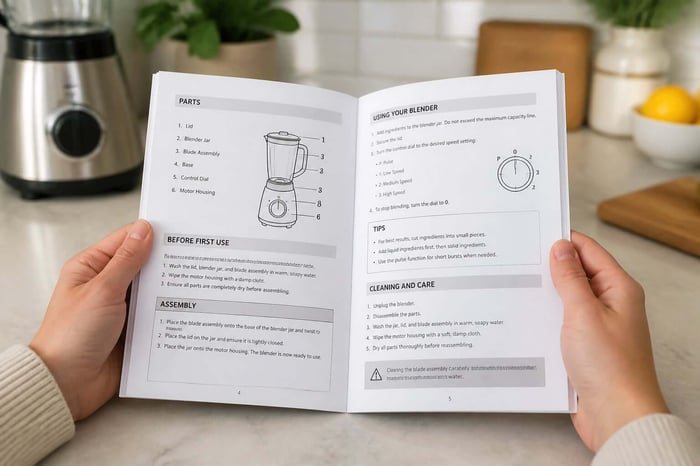
Most manuals follow the same structure regardless of brand. The setup or installation section comes first, followed by daily use instructions, then care and cleaning, and then troubleshooting. If your appliance is already installed and running, go straight to care and troubleshooting.
The care section tells you what to clean, how often, and with what product. A stainless steel dishwasher tub, for example, may require a citric acid rinse cycle monthly to prevent mineral buildup. A front-loading washer gasket needs to be wiped after every cycle to prevent mold. These are not suggestions. They are maintenance requirements that affect how long the appliance lasts.
The troubleshooting section uses symptom-based language you can match to what you are seeing. "Refrigerator not cooling" or "oven not reaching temperature" are actual headings in most manuals. Each entry gives you a list of possible causes and a check to perform before calling a technician.
Read more: Seasonal Home Maintenance Checklist to Stop Surprise Repairs
Look for Limits, Warnings, and Maintenance Intervals
Every manual contains limit information that directly affects how you use the appliance. A dryer manual will specify a maximum load weight, usually 12 to 16 pounds for a standard unit. A garbage disposal manual will list which foods must never go in, including fibrous vegetables and grease.
Maintenance intervals are listed in this section or in a dedicated maintenance schedule table. Common entries include:
Clean the refrigerator coils every 6 to 12 months
Replace the range hood grease filter every 3 months or after 30 hours of cooking
Flush the water heater sediment every 12 months
Check the dryer vent for blockage every 6 months
Warnings in the safety section also carry real weight. A dishwasher manual may warn against running the appliance while you are away from home due to hose failure risk. A water heater manual may specify the maximum safe temperature setting to prevent scalding, which for most homes is 120 degrees Fahrenheit.
Now that you know what the manual contains, the next step is deciding what to save so that information is available years from now.
What to Save for Future Problems
Reading the manual once is not enough. Saving the right details from it protects you long after the booklet is lost.
Model Details, Serial Numbers, and Install Dates
The three pieces of information worth saving from every appliance are the model number, the serial number, and the date it was installed. Together, they answer almost every question a repair technician or warranty department will ask. Without them, a service call takes longer, and a warranty claim may be delayed.
The serial number also encodes the manufacture date on most brands. Knowing that a refrigerator was manufactured in March 2019 and installed in June 2019 tells you whether a 10-year compressor warranty is still active. That single piece of information can be worth hundreds of dollars.
Record the purchase price too. It helps you decide whether to repair or replace when a major component fails. If a repair quote exceeds 50 percent of the original cost on an appliance that is already 8 years old, replacement is usually the smarter call.
Parts Lists, Filter Sizes, and Service Contacts
The back pages of most manuals contain a parts diagram and a list of replacement part numbers. Save the part numbers for components you replace regularly. A refrigerator water filter part number, a dryer belt model, and a dishwasher spray arm code are all worth keeping so you can reorder without dismantling the appliance to check.
Filter sizes matter more than most homeowners expect. The wrong HVAC filter size leaves gaps that allow dust past the filtration media. The wrong refrigerator water filter can reduce flow rate or fail to engage properly.
Also save the manufacturer's service line number, your installer's contact if you used one, and any extended warranty contact information. Having these in one place means you are not searching through emails when the appliance is actively broken.
A Better Way to Keep Home Records
Paper folders work until they don't. The real problem is not having records; it's having records you can find when something breaks.
Paper Folders Versus Digital Storage
A physical binder with labeled sections can hold manuals, receipts, and warranty documents together. That approach works well for some homeowners, especially those who prefer tangible organization. The risk is obvious: fire, flood, a move, or simply losing track of which drawer holds what can wipe out years of records.
Digital storage removes those risks, but an unorganized phone camera roll or a folder full of unsorted PDFs creates a different problem. You still spend ten minutes looking for the right file when the appliance is actively broken, and water is on the floor.
The most useful system ties documents to specific appliances rather than to a general folder. When your HVAC stops heating, you want to open your HVAC record and see the manual, the filter size, the last service date, and the warranty expiration all in one view.
How to Keep Records Private, Organized, and Easy to Reach
If you use a digital system, make sure it is encrypted and does not share your home data with third parties. Your home records include purchase dates, model numbers, install history, and home system details. That information should stay private and under your control.
Manse keeps your appliance records private, encrypted, and anonymized. Your records are not shared or sold. They are there when you need them and invisible to everyone else.
A good digital record for each appliance should include the brand, model, serial number, install date, purchase price, warranty expiration, filter or part sizes, the manual PDF, and your last service date. Set that up once, and you will not need to search again.
Build a System Before Something Breaks
The best time to organize your appliance records is before you need them, not during a repair call.
Start With the Most Expensive Items in Your Home
Your HVAC system, water heater, refrigerator, and washer and dryer are the appliances that cost the most to repair or replace. Start there. A central air system can cost $5,000 to $12,000 to replace. A water heater runs $800 to $2,000 installed. Knowing the manufacture date, the warranty status, and the maintenance history on these items affects every decision you make about them.
Go appliance by appliance. Pull the model number label, photograph it, find the manual online if you do not have it, and record the installation date from your purchase receipt or home inspection report. Most homeowners can document their five most expensive appliances in under an hour.
Once those are recorded, add the smaller appliances. A dishwasher warranty claim or a microwave filter replacement is much easier when the information is already in front of you.
Frequently Asked Questions
How Can You Find the Right Instruction Book for Your Exact Model Number?
Start on the manufacturer's website and enter the full model number, not just the brand or product type. The model number is usually found on a label inside the door frame, on the back of the appliance, or behind a bottom kick plate. An exact match on the model number returns the correct version for your production run, which matters because manufacturers update manuals between production years.
Where Can You Safely Download a Free PDF Without Ending Up on a Sketchy Site?
Go to the manufacturer's official support page first, since those downloads are always safe and accurate. Large third-party databases that index millions of manuals and allow free PDF downloads without requiring account creation are also reliable options. Avoid sites that ask you to install browser extensions or software to view the file.
What Should You Do if Your Appliance Is Older and the Manufacturer Site No Longer Lists It?
Search for the exact model number in archive-style manual repositories, which maintain records for discontinued products. Repair community forums often have scanned copies shared by other owners of the same model. If you cannot find a digital copy, contact the manufacturer's support line directly; some keep physical archives and can mail or email a copy on request.
How Do You Pull Up the Correct Guide for a GE Microwave, Oven, or Dishwasher in Minutes?
Go to the GE Appliances support page, navigate to Owner Manuals and Installation Instructions, and enter your model number in the search field. The model number on GE appliances is usually on a label inside the door cavity or on the back panel. The download is free and available as a PDF you can save directly to your phone or computer.
If You Lost the Paper Booklet, What Is the Fastest Way to Get a Replacement Copy Mailed or Printed?
Call the manufacturer's customer support line and request a physical replacement manual using your model and serial number. Some brands mail them free of charge; others charge a small printing and shipping fee. Downloading the PDF and printing the sections you need most, like troubleshooting and maintenance intervals, is often faster and costs less.
When the Guide You Found Does Not Match Your Controls, What Quick Checks Help You Confirm It Is the Right One?
Compare the model number on the label attached to your appliance against the model number on the cover or first page of the manual. Even a single character difference can mean a different production run with different features. If the layout of the controls in the manual diagram does not match your unit, search for a revised or alternate model number using the serial number, which can help identify the actual build date and correct document version.
Add Reminders So Maintenance Does Not Slip
Documentation without reminders is still passive. The manual tells you to clean the dryer vent every six months. Without a reminder, that task disappears into daily life and gets skipped for two years. Lint buildup in a dryer vent is one of the leading causes of residential fires in the US, making it one of the highest-stakes maintenance tasks a homeowner can overlook.
Attach maintenance reminders directly to each appliance record. When the HVAC filter needs replacing, you want a notification timed to that specific unit's schedule, not a generic calendar reminder you set and forgot.
Add your home to Manse for free and start tracking every appliance, warranty, and maintenance reminder in one private place. If you just realized your records are scattered across drawers and inboxes, Manse is where that stops. Build your home profile in minutes: no credit card, no noise, just your home organized.