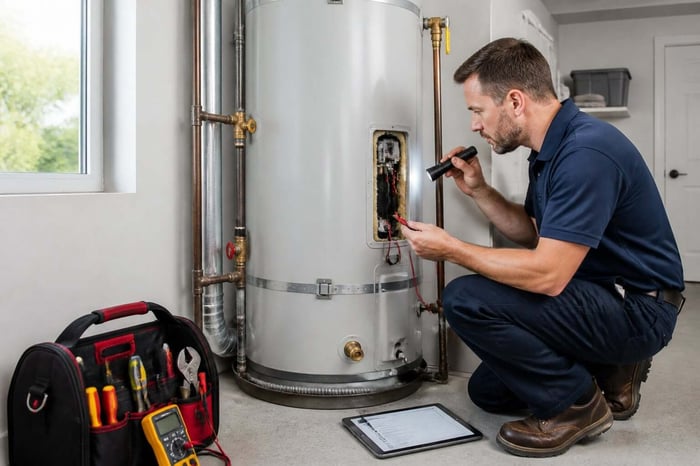

You turned on the shower, waited, and got cold water. The tank looks fine from the outside, so you open the panel and find a small red reset button. Now you are standing there wondering whether pressing it will fix your hot water or make things worse.
That button is a safety device, not a magic switch. It cuts power for a reason, and pressing it once is usually safe. If the water heater reset button trips again within days, the reset is not the fix; something inside the unit is failing and needs attention.
In this guide, you will find what the red reset button does, the safety checks to run first, numbered reset steps for electric tanks, how gas and tankless units differ, and when to stop and call a licensed pro. The answer is simpler than it feels right now.
What the Safety Switch Does
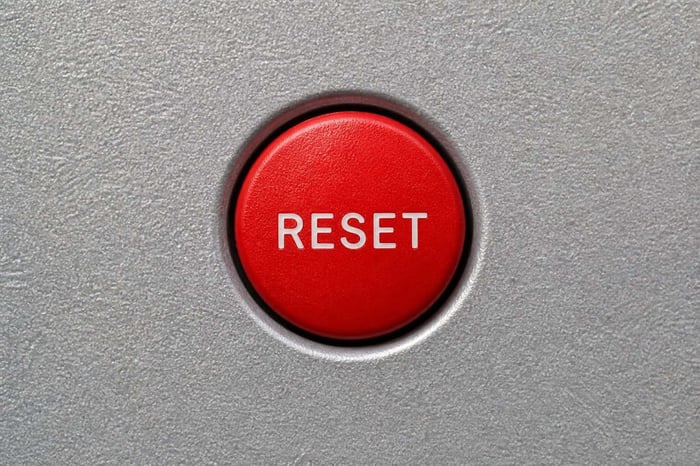
That red button is the high-limit safety switch, also called the ECO or emergency cut-off. It shuts power to the heating elements when water in the tank climbs past roughly 180°F.
The switch is mounted on the upper thermostat behind the access panel on most electric tanks. It protects you from scalding water and protects the tank from pressure damage. So when it trips, your home comfort takes a hit.
Why the High-Limit Switch Trips
Overheating is the usual trigger. A faulty thermostat can keep calling for heat after the water is hot enough, so the temperature runs away.
Other causes include a shorted heating element, a thermostat that lost contact with the tank wall, loose electrical connections, or a power surge. A thermostat malfunction is the most common single reason a hot water heater trips its thermal switch.
When a Single Reset May Help
A one-time reset makes sense after a storm, a power flicker, or a breaker trip. In those cases, the switch did its job, and nothing is actually broken.
You will know the water heater reset worked when hot water returns in about 30 to 60 minutes and stays steady for days.
Why Repeated Resets Are a Warning
Pressing the button over and over hides a real fault. Each trip means the water got dangerously hot again, and the parts that failed once will fail again.
Two trips in a week mean stop resetting and start diagnosing. That starts with a few safety checks before you touch anything.
Safety Checks Before You Begin
Never press the reset button with power live. You are reaching into a compartment with 240-volt electrical connections inches from your hand.
Start at the electrical panel. Find the double-pole breaker labeled for the water heater and switch it off. If the breaker was already tripped, leave it off for now and note it, because a tripped circuit breaker points to a different problem than a tripped reset button.
Turn Off Power at the Circuit Breaker
Flip the breaker to off, then confirm the power is actually dead. A non-contact voltage tester held near the thermostat wires is the fastest check.
Run these steps in order:
Switch off the water heater breaker at the main panel.
Remove the upper access panel screws with a screwdriver.
Peel back the insulation and plastic safety cover.
Test the wires with a voltage tester before touching anything.
Keep one hand out of the compartment while you work.
Check for Heat, Moisture, and Damage
Look before you press. Scorch marks, melted wire coating, or a burnt smell mean electrical problems that a reset will not solve.
Feel for moisture. A water heater leak near the thermostat or under the tank can cause faulty wiring and shorts, and it changes the whole repair from a button press to a service call.
When to Stop Immediately
Some findings end the job right there. Stop and get help if you smell gas, see water pooling under the tank, find damaged wiring, or the panel is hot to the touch.
If you smell gas, do not flip switches. Shut off the gas supply if you can reach the valve safely, leave the house, and call your gas utility from outside. If everything looks clean and dry, you are clear to reset.
Read more: Water Heater Problems: Symptoms, Causes, and When to Call a Pro
How to Reset an Electric Water Heater
Resetting an electric water heater takes about five minutes once the power is off. Everything happens behind the upper access panel.
Find the Upper Access Panel
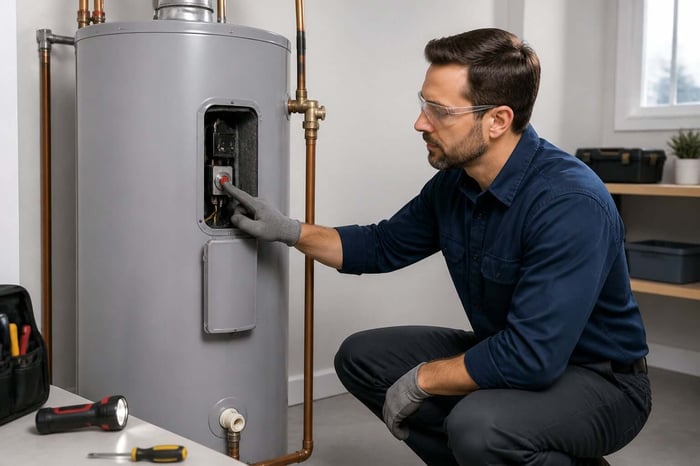
Most electric tanks have two small metal panels on the front, one high and one low. The reset button location is behind the upper one, sitting on the face of the upper thermostat.
Remove the screws, lift the panel away, and fold back the fiberglass insulation. You should see a small red or black square button between two screw terminals. Some models use a black button, so color alone does not tell you much.
Press the Red Reset Button
Press the red reset button firmly with your fingertip until you feel and hear a click. A click means the high-limit switch has closed again.
If the button will not stay in, it did not reset. Do not force it with a tool. Press once and stop, since a button that refuses to hold points to a failed switch or a thermostat that is still reading high heat.
Restore Power and Wait for Hot Water
Put the plastic cover and insulation back exactly as you found them, then screw the panel on. Bare wires with no cover are a real shock hazard.
Now flip the breaker on and wait. A 40 to 50 gallon tank needs roughly 30 to 60 minutes to restore hot water, longer after a power surge drained the tank of heat. Run a tap after an hour to confirm your hot water supply is back.
Gas and tankless owners will not find a red button at all, and that changes the steps.
How Gas and Tankless Models Differ
A gas water heater rarely has a user-accessible reset button. Its safety system runs through the pilot light, thermocouple, and gas control valve instead of an electric thermal switch.
Why Most Gas Units Do Not Have a Red Button
Gas tanks do not send 240 volts to heating elements, so there is no high-limit switch to reset. If the burner shuts down, the gas valve has closed because the pilot flame went out or a sensor read a fault.
Some high-efficiency gas models add electronic controls with a reset function, usually a small button or a status light sequence on the control board.
Pilot Light and Gas Control Checks
On a standing pilot unit, look through the small window near the base for a flame. No flame means the pilot needs relighting using the sequence printed on the tank label.
A pilot that lights and dies within a minute usually points to a weak thermocouple. That is a part replacement, not a reset, and it is worth logging the date so you can spot a pattern later.
Use the Manual for Tankless Error Resets
Tankless water heaters show an error code on the display or remote panel. The code tells you what tripped, and the manual tells you the reset method for that specific code.
Most tankless resets involve turning power off for a minute, then back on, or holding a designated button. Guessing clears the code without fixing the cause.
If the Unit Still Will Not Heat
No hot water after a proper reset means a part has failed. The reset button did what it could.
Check for a Tripped Breaker or Power Problem
Go back to the panel. A breaker that trips the moment you switch it on usually means a shorted heating element or damaged wiring inside the unit.
Do not keep resetting the breaker. Repeated trips are an electrical hazard, and each attempt puts more stress on the wiring.
Common Causes of a Button That Keeps Tripping
When the reset button keeps tripping, the cause is almost always one of these:
A faulty thermostat that never stops calling for heat
A shorted or grounded heating element
Heavy sediment buildup and mineral deposits insulating the lower element
Loose wiring at the thermostat terminals
A worn high-limit switch that trips below its rated temperature
A depleted anode rod letting corrosion accelerate inside the tank
A multimeter can test element resistance and thermostat continuity if you are comfortable working with power off. Write down what you find, including the reading and the date.
When to Call a Licensed Professional
Call a licensed technician or licensed plumber if the breaker trips repeatedly, the reset button will not hold, or you find scorched wiring. The same goes for water weeping from the pressure relief valve or the tank base.
Before you call, gather the model and serial number off the tank label. That one step shortens the visit and tells you fast whether the repair is still covered.
Keep Your Water Heater Records Ready
The homeowners who handle a cold shower calmly are the ones who already know what tank they own. Model number, install date, warranty length, and last service visit answer most questions in under a minute.
Record the Model, Warranty, and Service Work
Snap a photo of the rating plate today, while the panel is open and the light is good. Most tanks carry a six to twelve-year warranty, and many failures happen inside that window.
Write down every event: the day the reset button tripped, the element you replaced, the plumber who came out, and what it cost. When the same fault returns in two years, that history tells you whether to repair the unit or replace it.
Schedule Maintenance That Supports Efficiency
Sediment buildup is the quiet cost in most tanks. It insulates the burner or lower element, drags down energy efficiency, and makes overheating more likely.
Set a yearly rhythm you can actually keep:
Flush a few gallons from the drain valve once a year to clear mineral deposits
Test the pressure relief valve annually and watch for drips
Inspect the anode rod every three years, sooner with hard water
Check the floor around the tank monthly for any water heater leak
Keep the thermostat at 120°F for safe, steady hot water supply
Those five habits protect the tank that just left you standing in cold water.
Frequently Asked Questions
Why Does Your Water Heater Keep Tripping the Reset Button?
Repeated trips usually mean a faulty thermostat, a shorted heating element, sediment buildup, or loose wiring. The switch is reacting to real overheating each time. Stop resetting after the second trip and have the unit tested.
Where Can You Find the Reset Button on an Electric Water Heater?
Look behind the upper access panel on the front of the tank. Remove the screws, fold back the insulation, and you will see a small red or black button on the upper thermostat. Cut power at the breaker before you open the panel.
How Long Should You Hold the Reset Button Before Releasing It?
Press it firmly for a second or two until you feel a distinct click, then let go. There is no need to hold it longer. If it does not click, the switch is not resetting, and holding it will not change that.
What Should You Check if the Reset Button Will Not Click or Stay In?
A button that will not hold usually means the water in the tank is still too hot, or the switch itself has failed. Wait an hour and try once more. If it still refuses, a thermostat or high-limit switch replacement is likely.
How Long Will It Take for Your Water Heater to Make Hot Water After a Reset?
Most tanks need 30 to 60 minutes to heat a full load after a successful reset. Larger tanks and units with one working element take longer. If nothing is warm after 90 minutes, the reset did not solve the problem.
Can You Reset a Gas Water Heater if It Does Not Have a Reset Button?
Yes, though the process is different. You relight the pilot light using the instructions on the tank label, or follow the gas control valve sequence for your model. If the pilot will not stay lit, the thermocouple usually needs replacing.
Your Water Heater Told You Something Today
One press of the red reset button is a fair first move. Two trips in a week is your tank telling you a part has failed, and that is the moment to call a pro instead of pressing again.
Either way, the useful thing you have right now is information: the model on the label, the date this happened, and what you did about it. Write it down while it is fresh, because the next cold shower will feel very different when you already know the tank's age and warranty status.
Add your home to Manse and log the water heater model, warranty, and today's reset in a few minutes. Manse is free to start with no credit card required, and your records stay private.