
Your garbage disposal was working fine an hour ago, and now it just hums or does nothing at all when you flip the switch. Water is sitting in the sink, and you are staring at the cabinet under the counter wondering what to do next. Before you call a plumber, there is a small button that fixes this problem more often than you might think: the InSinkErator reset button.
That button works like a tiny circuit breaker built into your disposal. It trips when the motor gets too hot, and pressing it back in can bring the unit right back to life. The trick is knowing where it is, how to press it safely, and what to do if pressing it does not solve anything.
In this guide, you'll find where the reset button sits on your unit, how to press it the right way, and what it means if the disposal still will not run. No jargon, no filler, just what you need to fix the problem and get your sink working again.
What the Overload Protector Does
Standing over a sink full of dirty water with a silent disposal is not a great way to end dinner cleanup. Before you touch anything, it helps to know what actually stopped your disposal from running in the first place. That part is called an overload protector, and it is built into every InSinkErator unit for a reason.
The overload protector is a safety device, similar to a small thermal overload protector found in other motorized appliances. It monitors the motor's temperature and current draw and shuts the unit off before the motor burns out. Once it trips, the disposal will not run again until you manually push the reset button back into place.
Why the Disposal Shuts Off Suddenly
A disposal that shuts off mid-use is protecting itself, not breaking down. When the motor works too hard for too long, heat builds up inside the housing. The overload protector senses that heat and cuts power before serious motor overheating causes lasting damage.
Common Triggers for Motor Overheating
Several everyday habits can trigger an overload:
Running the disposal continuously for several minutes straight
Grinding large amounts of food waste at once
A jam that forces the motor to strain against a stuck blade
A power surge that spikes current through the motor briefly
Knowing these triggers helps you avoid the next shutdown, not just fix this one.
Find the Button Under the Sink
You already know something stopped your disposal, and now you need to find the part that fixes it. Reaching blindly under the sink cabinet in the dark is frustrating, especially with a flashlight in one hand and a wrench in the other. Knowing exactly where to look saves you from patting around wet pipes for no reason. For the fuller walkthrough across every brand, Manse's full guide to resetting a garbage disposal covers the general process this page focuses on for InSinkErator specifically.
Homeowners who deal with more than one appliance issue a year often start keeping notes on where things are and how they work. Manse gives you a private place to jot down details like this, tied to your home rather than scattered across old texts and receipts. It is a small habit that pays off the next time something under the sink stops responding.
Here's the exact reset button location on an InSinkErator, and how it compares to other brands under your counter.
InSinkErator Reset Button Location
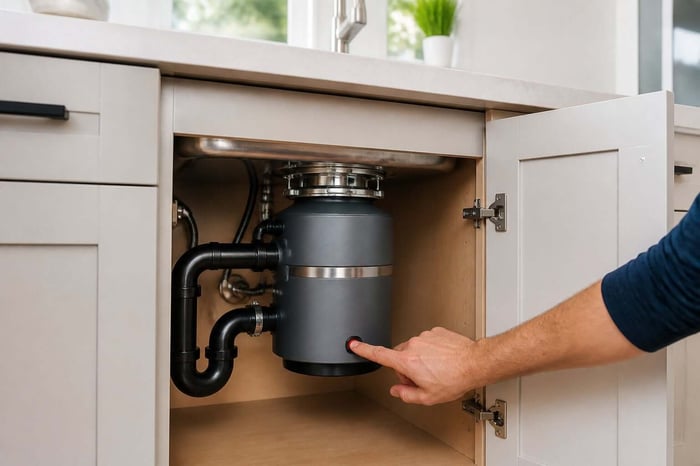
On most InSinkErator models, the reset button sits on the bottom of the unit, facing the floor. It is a small red square button, and you will need to crouch down or use a mirror and flashlight to see it clearly. If it has tripped, the button will look pressed outward, sitting about a quarter inch lower than its resting position.
Models with EZ Connect use a different setup entirely, relying on an automatic overload switch instead of a manual button. For those units, the reset process happens through the power source rather than a physical button push.
How Other Brands Position Their Buttons
If your home has a Waste King or Moen disposal instead, the reset button location shifts slightly. Waste King units often place the button on the side or bottom of the housing, similar in shape to InSinkErator's design. Moen disposals sometimes use a reset switch near the base, so checking your model's manual saves guesswork.
Reset the Unit Safely
You found the button, and now the real question is how to press it without making things worse. Pressing it too soon after a shutdown, or with the power still live, can trip it again immediately. A few careful steps make the difference between a quick fix and a repeat trip to the cabinet under the sink.
This is exactly the kind of detail worth writing down once you sort it out. Manse lets you log what triggered the shutdown and how you fixed it, so the next time it happens, you are not starting from zero. It keeps that record private and tied to your home, not buried in an old email thread.
Here's the full reset sequence, including the steps for EZ Connect models, following InSinkErator's own official reset instructions.
Turn Off Power and Let the Motor Cool
Start by switching off the wall switch or unplugging the disposal if it uses a plug-in air switch. If you are unsure, flipping the breaker for that circuit at your electrical panel works too. Give the motor about ten minutes to cool down before you touch the reset button, per InSinkErator's own guidance for standard button models.
Press the Button and Test With Cold Water
Once the motor has cooled, locate the red button on the bottom of the unit and press it firmly. You should feel or hear a slight click as it pops back into place. Turn on cold water at the sink, then flip the switch to test that the reset worked.
Follow the Right Sequence for EZ Connect Models
EZ Connect units skip the manual button entirely and rely on the power cycle itself. Turn off the wall switch, or unplug the air switch, and wait the full 20 minutes before restoring power. Trying to force a reset sooner will usually just trip the protector again.
Clear a Jam Before Trying Again
If pressing the reset button did nothing, or the disposal still just hums, something is likely stuck inside. That stuck feeling is often a jam, not a dead motor, and it is worth checking before assuming the worst. A jammed grind plate is one of the most common reasons resets do not hold.
Once you clear a jam, it helps to note what caused it, especially if it happens more than once. Manse keeps a simple record of maintenance moments like this, so patterns become obvious over time. That kind of tracking stays private to your home profile, not shared or sold anywhere.
Here's how to clear a jam using a hex wrench, and how to keep it from happening again.
Free the Grind Plate With an Allen Wrench
Most InSinkErator units have a hex socket on the bottom, opposite the reset button. Insert an Allen wrench into that hex socket and turn it back and forth firmly. This motion frees a jammed grind plate without you ever needing to reach inside the unit.
Remove Obstructions Without Reaching Inside
Once the plate turns freely, use tongs or pliers to pull out any visible debris from the top opening. Never put your hand down into the disposal, even with the power off. A flashlight helps you spot bones, fruit pits, or fibrous waste caught against the blades.
Prevent Another Overload
A few habits reduce the odds of overloading the motor again:
Run cold water before, during, and after grinding food waste
Feed food in small amounts instead of dumping it all at once
Avoid grinding fibrous scraps like celery or corn husks
Never pour grease down the disposal
Know When Resetting Is Not Enough
Sometimes you press the button, wait the full ten minutes, and try again, and the disposal still refuses to run. That is frustrating, especially when you have already checked for jams and given the motor time to cool. At this point, the problem is likely something the reset button cannot fix on its own.
Before calling anyone, it helps to know your unit's model number and warranty status. Manse stores that information in one private spot, so you are not digging through drawers while a plumber is on the phone. Having it ready can save you a service call if the disposal is still under warranty.
Here are the signs that mean it's time to stop troubleshooting and call a professional.
What a Reset Button That Will Not Stay In Means
If the button pops back out every time you press it, the overload protector is sensing an ongoing problem. This usually points to a jam that has not fully cleared, or a motor that is drawing too much current. Repeatedly forcing the button in without fixing the root cause can damage the unit further.
Check the Outlet, GFCI, and Breaker
Before blaming the disposal itself, check the power source it relies on. A tripped GFCI outlet or a flipped circuit breaker can look exactly like a failed reset button. Reset the GFCI, flip the breaker back on, and try the disposal switch again before troubleshooting further.
Signs the Motor Needs Professional Service or Replacement
A disposal that hums loudly but never spins usually has a mechanical problem beyond a simple jam. Burning smells, repeated tripping within minutes, or a motor that will not hold a reset are signs of more serious motor overheating damage. At that point, a licensed plumber or appliance technician can confirm whether repair or replacement makes more sense.
Be Ready for the Next Shutdown
Your disposal is running again, water is draining, and the sink is finally quiet. That relief is real, but disposals rarely stop for good after one reset; the same triggers tend to repeat over time. Being ready for the next shutdown means knowing a bit more than you did an hour ago.
That is where a little organization goes a long way. Manse lets you save your disposal's model number, install date, and warranty details in one private home profile, the same place Manse's guide to appliance manuals covers for the rest of the house. The next time your garbage disposal acts up, you will already know what you are working with instead of starting the search over again.
Turning today's fix into a habit is as simple as keeping a record you can check the next time something under the sink goes quiet.
Frequently Asked Questions
Where is the reset button on an InSinkErator garbage disposal?
On most standard models, it is a small red square button on the bottom of the unit, facing the floor under your sink. EZ Connect models use an automatic overload switch instead, reset through the power source rather than a manual button.
Why did my garbage disposal stop working and need to be reset?
The motor likely overheated from running too long, grinding too much food waste, or straining against a jam. The built-in overload protector shut off power automatically to prevent lasting motor damage.
How long should I wait before pressing the reset button after the disposal overheats?
Give the motor about ten minutes to cool before pressing the button the first time. If it will not stay in, wait up to 20 minutes and try again before assuming a bigger problem.
What should I do if the reset button will not stay in?
Check for a jam near the grind plate using an Allen wrench in the hex socket on the bottom of the unit. If it still will not hold after clearing debris, check the GFCI outlet and circuit breaker before calling a plumber.
Why is my garbage disposal humming after I reset it?
A humming sound with no spinning usually means the flywheel is jammed or the motor cannot turn freely. Turn off power immediately and clear the jam with an Allen wrench before trying the switch again. This garbage disposal humming guide covers this specific symptom in more depth.
How do I get an InSinkErator disposal spinning again after a reset?
Clear any visible jam first, then press the reset button firmly until it clicks into place. Run cold water and flip the switch; if it hums instead of spinning, the flywheel likely needs manual freeing.
Keep Your Kitchen Running Smoothly
A tripped reset button is usually a quick fix, not a sign your disposal is failing. Press the button, clear any jams, check your power source, and you will solve most shutdowns within minutes. When resetting does not hold after repeated tries, that is your signal to bring in a professional.
The bigger habit worth building is keeping your appliance details somewhere you can find them fast. Knowing your disposal's model number and warranty status turns a stressful moment into a quick phone call instead of a scramble.
Manse gives you a free home profile where those details live, private and organized, ready for whenever the next appliance acts up. Setting it up takes minutes, requires no credit card, and leaves you one step ahead the next time something under the sink goes quiet.